Quake3World.com Forums
     Level Editing & Modeling
        Industrial Texture Pack


Post new topicReply to topic
Login | Profile | | FAQ | Search | IRC


Print view Previous topic | Next topic 
Topic Starter Topic: Industrial Texture Pack

The Illuminated
The Illuminated

Joined: 08 Sep 2000
Posts: 1073
PostPosted: 03-17-2012 02:17 PM           Profile Send private message  E-mail  Edit post Reply with quote


Now that I am finished with the Bridge Crane concept map I thought I would release the textures so all of you can go industrial nuts! I also released the PS 5.x source file, so if you want more stuff then you can create your own. The source file probably only works with the latest version of PS so don't moan at me if you can't load it!

http://www.simonoc.com/pages/materials/tpindustrial/index.htm

The download files only have high resolution 1024x1024 textures and no Q3 shader file. I think by now most people understand how to create their own and will probably want to re-arrange the textures to suit their own projects anyway. If anyone does create a shader file and want to share, then post a link to this thread. I have posted on my website the size of the files, so don't be surprised if it takes a while to download them. I am sure my ISP is not going to be happy! :D

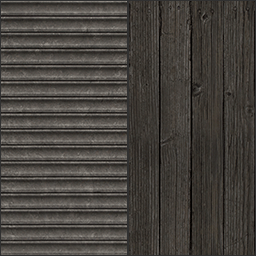
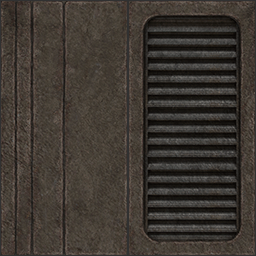
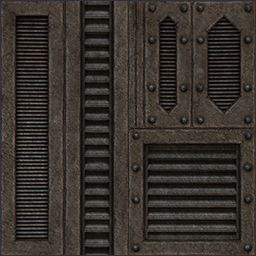
Here is some texture examples, more on my page:
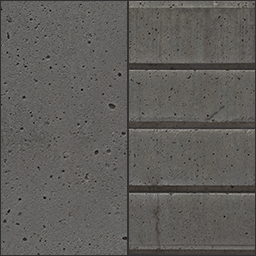
ImageImage
ImageImage

Screenshot of the Photoshop 5.x source file in use:
Image


_________________
Well he was evil, but he did build alot of roads. - Gogglor
Image


Top
                 

Grunt
Grunt

Joined: 29 Feb 2012
Posts: 50
PostPosted: 03-17-2012 06:25 PM           Profile Send private message  E-mail  Edit post Reply with quote


I've been waiting for this since I first saw some of the crane level shots :) They turned out outstanding! Excellent work sock.


Top
                 

The Illuminated
The Illuminated

Joined: 12 Mar 2005
Posts: 1939
PostPosted: 03-17-2012 06:49 PM           Profile   Send private message  E-mail  Edit post Reply with quote


Nice. This texture pack is sexy. Downloading the source and base right now :up:


_________________
Software Laboratory

My Portfolio


Top
                 

Insane Quaker
Insane Quaker

Joined: 28 Dec 2009
Posts: 289
PostPosted: 03-17-2012 10:43 PM           Profile Send private message  E-mail  Edit post Reply with quote


On behalf of everyone, I say thanks for the textures. High-res too.


Top
                 

The Afflicted
The Afflicted

Joined: 10 Aug 2009
Posts: 813
PostPosted: 03-18-2012 04:02 AM           Profile Send private message  E-mail  Edit post Reply with quote


I enjoyed reading the writeup about your Bridge Crane level; really neat what you did with the fog and the alpha blending.
Btw, what r_speeds are you getting in the crane level?


_________________
Portfolio
Twitter


Top
                 

Veteran
Veteran

Joined: 23 Aug 2011
Posts: 174
PostPosted: 03-18-2012 10:55 AM           Profile Send private message  E-mail  Edit post Reply with quote


Incredible textures pack, thank a lot sock.


Top
                 

The Illuminated
The Illuminated

Joined: 08 Sep 2000
Posts: 1073
PostPosted: 03-19-2012 02:42 PM           Profile Send private message  E-mail  Edit post Reply with quote


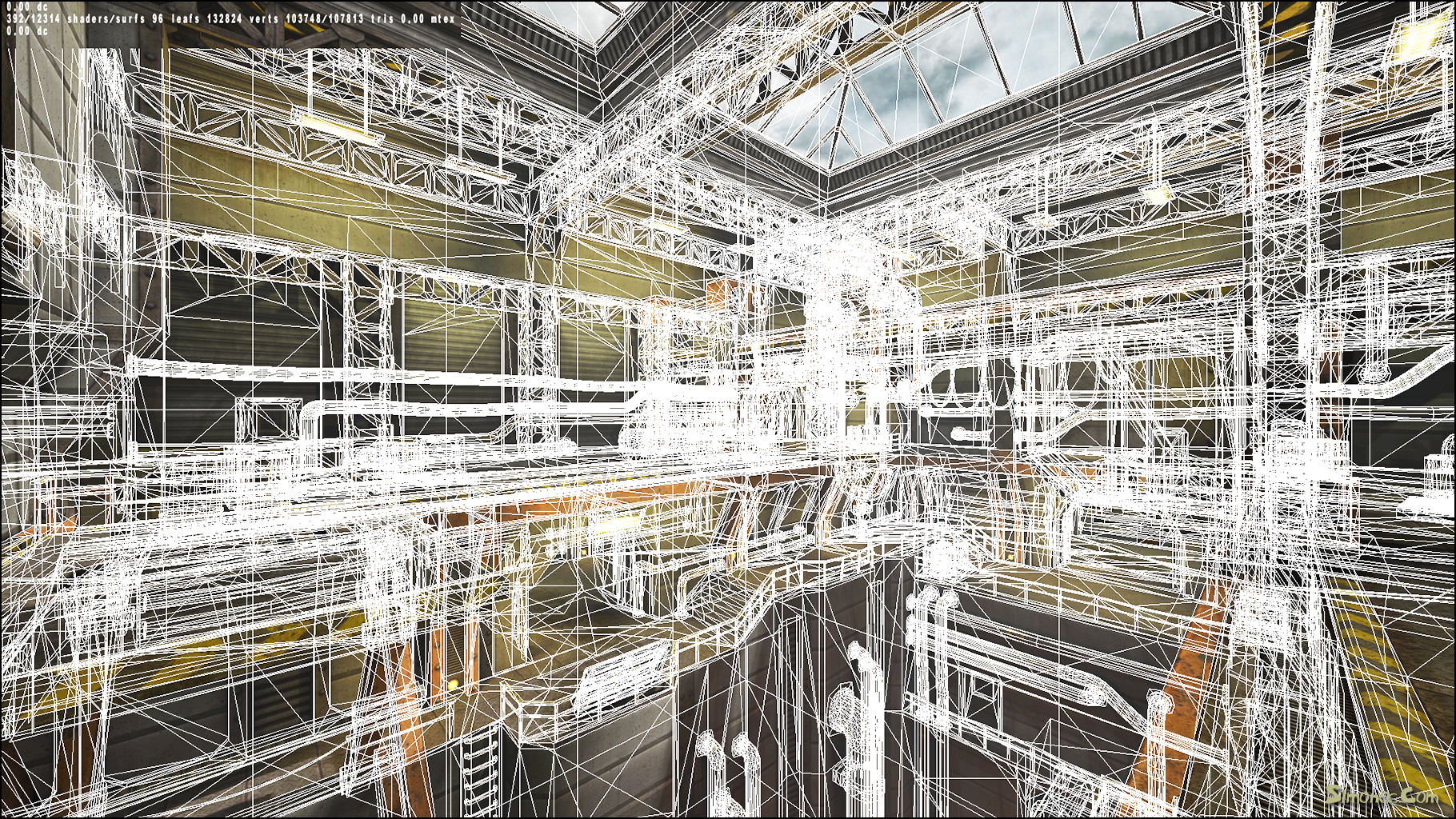
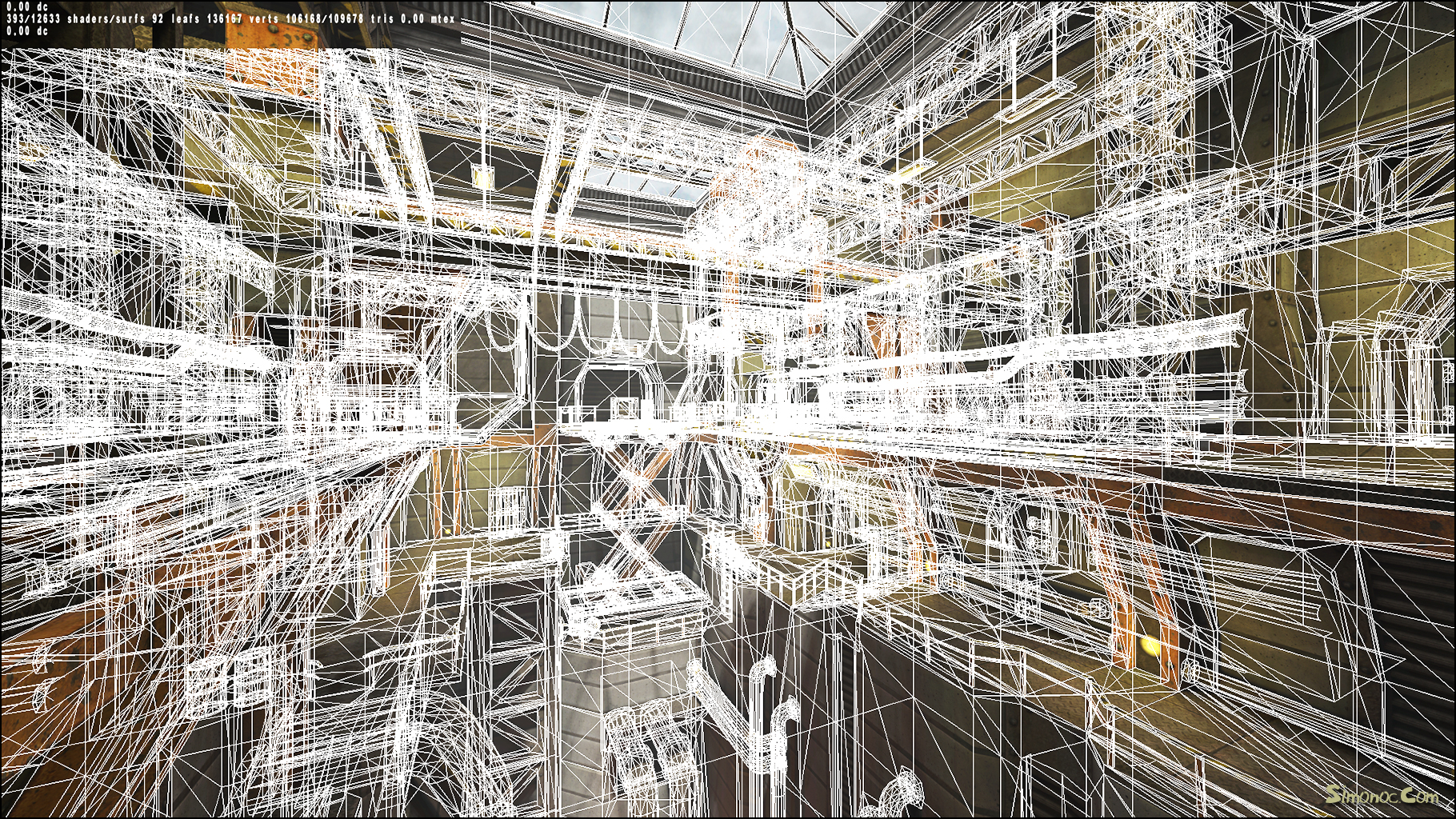
@cityy, the crane map has no optimization, so the rspeeds are crazy (100K+). Lots of stuff could be turned into alpha textures and tons of models could be reduced in detail to make it playable, but the exercise was to see what the textures looked like with a map pushing Q3 to the limits. The map has 5500 Brushes, 390 models and 150 lights. Most stuff is models because of rotation and scale issues with Q3 and the editor.

Here is some links to showtris screens (massive images 2Mb+)
rspeed counters in the corner.

http://www.simonoc.com/images/design/concept/indust_f01wd_wire.jpg
http://www.simonoc.com/images/design/concept/indust_f02wd_wire.jpg


_________________
Well he was evil, but he did build alot of roads. - Gogglor
Image


Top
                 

Grunt
Grunt

Joined: 29 Feb 2012
Posts: 50
PostPosted: 03-19-2012 05:35 PM           Profile Send private message  E-mail  Edit post Reply with quote


dear god... haha


Top
                 

Recruit
Recruit

Joined: 28 Jan 2011
Posts: 3
PostPosted: 03-19-2012 09:47 PM           Profile Send private message  E-mail  Edit post Reply with quote


Great texture set. Can't wait to use it in a map.


Top
                 

The Illuminated
The Illuminated

Joined: 21 Jul 2002
Posts: 1664
PostPosted: 03-24-2012 01:34 AM           Profile Send private message  E-mail  Edit post Reply with quote


awesome! good tex's sock. I just started back mapping again and have been looking for a tex set, now I got what I need :D


_________________
Team *A51* QL


Top
                 

Grunt
Grunt

Joined: 21 Jul 2009
Posts: 54
PostPosted: 03-24-2012 07:54 AM           Profile Send private message  E-mail  Edit post Reply with quote


Looks nice Sock - Thanks for the freebies!


_________________
www.mrlego.com * www.sbhostingsolutions.com


Top
                 

Warrior
Warrior

Joined: 03 May 2010
Posts: 81
PostPosted: 04-02-2012 03:38 AM           Profile Send private message  E-mail  Edit post Reply with quote


I started croping out the individual parts of these textures.
The way they are present in Sock's pack doesn't suit my workflow. And I guess others here have the same problem.
As great as they are, I can't work with them in this state :).

Since I won't have time to continue croping for the whole April, I thought I'd offer my finished stuff so far and ask here if someone has the time and will and software to continue the work.
I kept the individuals in their original state, .tga and size-wise, and sorted them into your classic subfolders, such as _base, _floor, _wall, etc.

This is the stuff so far:

Image

It contains most individuals from and till "metb_grid" in alphabetical order.

I would prefer to sent the pack to some email instead of upping it to a public spot as it is work in progress and the usage of it in a map as is might lead to nameing conflicts in the future.

So, if you are willing to participate, drop me a PM.

Sock is informed about this and gave permission.
If you'd like to join in, I'd very much appreciate it. But respect the source and select/crop/copy+paste with 100% accuracy. There's no such thing as "close enough" in this procedure ;).


EDIT: no need for email adresses anymore. Upped it to a password-protected spot. So still, drop me a PM if you're interested.


Last edited by Ferrao10 on 04-02-2012 08:34 AM, edited 1 time in total.

Top
                 

foolproof
foolproof

Joined: 11 Jan 2001
Posts: 7286
PostPosted: 04-02-2012 07:46 AM           Profile Send private message  E-mail  Edit post Reply with quote


Nice initiative, Ferrao. I won't be participating, because I just don't have the time.

And thanks sock for the excellent textures.
Downloaded, and having a blast playing around in Radiant with them.
You're a fucking wizzard!

Do you have a job in game dev?


Top
                 

I'm the dude!
I'm the dude!

Joined: 04 Feb 2002
Posts: 10434
PostPosted: 04-02-2012 07:49 AM           Profile Send private message  E-mail  Edit post Reply with quote


_________________
GtkRadiant | Q3Map2 | Shader Manual


Top
                 

foolproof
foolproof

Joined: 11 Jan 2001
Posts: 7286
PostPosted: 04-02-2012 08:27 AM           Profile Send private message  E-mail  Edit post Reply with quote


Cool.
Envying the skills :)


Top
                 

Warrior
Warrior

Joined: 03 May 2010
Posts: 81
PostPosted: 04-25-2012 01:57 AM           Profile Send private message  E-mail  Edit post Reply with quote


Back from vacations, still have some days off and got permission to spend some of that time on the project :).

With the sheer amount of textures one can extract from the originals I ran into an "overview-problem". As they are .tgas, windows-explorer won't preview them. Does anyone here know of a nice, little (free) app that can preview .tgas like explorer does with .jpgs? For now I'm directly using radiant to keep the overview but it's slowly reaching the point-of-practicality.


Top
                 

Commander
Commander

Joined: 05 Jun 2008
Posts: 117
PostPosted: 04-25-2012 08:31 AM           Profile Send private message  E-mail  Edit post Reply with quote


Sage Thumbs: A free program for your thumbnails.


Top
                 

Warrior
Warrior

Joined: 03 May 2010
Posts: 81
PostPosted: 04-25-2012 08:58 AM           Profile Send private message  E-mail  Edit post Reply with quote


Thank you, that's perfect.
Never had the need for such a thing, don't even own a camera.
In the meantime I had fun with "metb_light3" ;).


Top
                 

Grunt
Grunt

Joined: 29 Apr 2012
Posts: 59
PostPosted: 05-10-2012 06:42 AM           Profile Send private message  E-mail  Edit post Reply with quote


And what about these textures? :confused:
http://www.simonoc.com/pages/materials/ ... /index.htm

that would be nice. :D


Top
                 

Warrior
Warrior

Joined: 03 May 2010
Posts: 81
PostPosted: 05-12-2012 05:55 AM           Profile Send private message  E-mail  Edit post Reply with quote


The edited version can be found at:

http://www.mediafire.com/?6tu91eysnr0pdmj

It's meant for old-school mappers like myself and is a break-up into the individual parts of the original pack, sorted in known order like _base, _support, _trim, etc.
I left the resolution as is, so expect large dimensions.

Thanks to Sock for creating these wonderful textures.
Have Fun.


edit: and, no, no shaders. Like with the original, do it yourself.


Top
                 

Boink!
Boink!

Joined: 19 Apr 2003
Posts: 4048
PostPosted: 07-14-2012 07:24 AM           Profile Send private message  E-mail  Edit post Reply with quote


This might be the push AEcantw2 needs to give it some realism... the four colours might go well with the different four sectors. Downloading...


Top
                 

Boink!
Boink!

Joined: 19 Apr 2003
Posts: 4048
PostPosted: 07-14-2012 09:53 AM           Profile Send private message  E-mail  Edit post Reply with quote


This might be the push AEcantw2 needs to give it some realism... the four colours might go well with the different four sectors. Downloading...

Quote:
The edited version can be found at:
http://www.mediafire.com/?6tu91eysnr0pdmj

This is indeed the more "useful" version of the base textures. Alas the other colours (other than yellow) are not part of this pack. I might need to cut up the others (orange, blue, and green) manually. Using the original base names Sock used, adding a number to them as Ferraro10 did. Sorting them into the folders Ferraro10 defined. Hope that is OK with everyone.

No idea when I will get to that, depends on if I use the textures or not.


Top
                 

Cool #9
Cool #9

Joined: 01 Dec 2000
Posts: 36631
PostPosted: 07-15-2012 10:44 PM           Profile   Send private message  E-mail  Edit post Reply with quote


Haven't looked at the textures in detail, but aren't the other colors just recolors of the ones you already have? In that case, it's probably less work to recolor the ones you already have rather than cutting up the source material again.


_________________
Get mods & maps at Engines of Creation


Top
                 

Boink!
Boink!

Joined: 19 Apr 2003
Posts: 4048
PostPosted: 07-15-2012 11:41 PM           Profile Send private message  E-mail  Edit post Reply with quote


Then again I'd prefer to stick with the artists vision :)... and not meddle up the originals trying to dilettantely recolour them. I took a look at the cut up textures... and found the naming a bit strange. Also a few textures were not cut up. I am not sure if the yellow ones were missing, and the other coloured ones had additional images. Will post an example texture and my cut-up suggestion in a while.

Using PS' Slice tool you can cut up textured on a 128 pixel grid pretty easily. Most work is the consistent naming. You have to do it once per texture (all 3 other colours use the same slicing).


Top
                 
Quake3World.com | Forum Index | Level Editing & Modeling


Post new topic Reply to topic


cron
Quake3World.com
Powered by phpBB © 2000, 2002, 2005, 2007 phpBB Group