Page 5 of 8
Re: State of GTKradiant? - ZeroRad Development
Posted: Wed Jan 06, 2010 1:55 pm
by Hipshot
I fixed the always on top with an external application. Could be useful to some.
(
http://www.labnol.org/software/tutorial ... -top/5213/)
(This is my radiant with the surface insp on top, very handy for checking the problem mentioned below:
http://zfight.com/misc/images/editors/r ... 012009.jpg)
Another very annoying bug, you guys must as well have come across this many many times. That textures offsets them selves a unit or two, sometimes by 10th of a unit or so. Very very annoying, could this be fixed? I guess it has something to with rotate and the target coordinates or something... don't really know, I just know it's a pain on small things...
Re: State of GTKradiant? - ZeroRad Development
Posted: Wed Jan 06, 2010 3:31 pm
by AEon
always-on-top.exe
Indeed that is a pretty practical tool, very simple to use: Select window,
Ctrl+Space and it stays on top. Though I still don't really need it.
Hipshot wrote:Another very annoying bug, you guys must as well have come across this many many times. That textures offsets them selves a unit or two, sometimes by 10th of a unit or so. Very very annoying, could this be fixed? I guess it has something to with rotate and the target coordinates or something... don't really know, I just know it's a pain on small things...
Hmm... I noticed even under v1.4 that texture alignment on small brushes, even with texture offset/rotation lock turned on will simple not stay locked properly.
Hipshot, maybe you could create a mini-map (
.map) file that let's us reproduce the issue. And also add a step by step list that would let us try this out. That should help xpc track down the problem.
My guess is this is some sort of precision cropping happening (i.e. the number of "significant" float digits get cut off somewhere in the code. Or that a conversion from an initial double to float happens).
Re: State of GTKradiant? - ZeroRad Development
Posted: Wed Jan 06, 2010 8:34 pm
by Hipshot
AEon wrote:Hmm... I noticed even under v1.4 that texture alignment on small brushes, even with texture offset/rotation lock turned on will simple not stay locked properly. Hipshot, maybe you could create a mini-map (.map) file that let's us reproduce the issue. And also add a step by step list that would let us try this out. That should help xpc track down the problem.
My guess is this is some sort of precision cropping happening (i.e. the number of "significant" float digits get cut off somewhere in the code. Or that a conversion from an initial double to float happens).
It happens here in 1.6 too, I will work with 1.6 now for this thread to keep it version consistent, less confusion that way.
Here's a test level:
http://zfight.com/misc/files/q3/coord_test.map
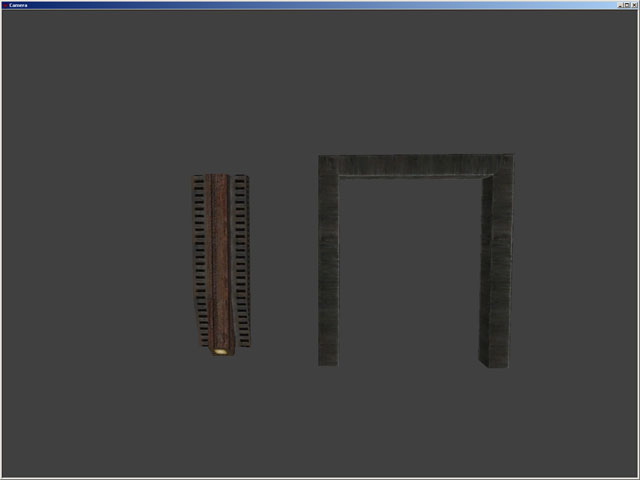
It's units I actually use for my current level, but the lamp fixture uses compatible textures here.
If you select these and duplicates them, both units will have various errors with the some faces.
Most notable is the angled lamp, which will become very strange when duplicated.
But it's totally random, doesn't happen all the time, not the same error, etc, sometimes it works doing a duplicate and then another one, etc, super random, hard to repro.
Re: State of GTKradiant? - ZeroRad Development
Posted: Wed Jan 06, 2010 8:41 pm
by Hipshot
Bug:
# Paste to camera doesn't work (didn't work in 1.4 either) or I'm using it the wrong way? alt-v?
# Doesn't work to change the grin size on the numeric keypad.
Feature:
# Does the lock button in the surface inspector need to be enabled by default? Isn't that just stupid, why is it even there?
# Isn't it possible to add a button that makes you texture nudge by one(1) unit no matter what the Step value says? Like also holding CTRL when nudgeing, so it becomes ctrl-shift-[direction arrow]
# Can't the surface inspector update it's values in real time, if you have it open and changes the texture using the keyboard?
# Instead of displaying the path to the level in the task bar, show the name of the level? Very practical if you have more than one instance open (Yes I know about the tool tip thingie).
Re: State of GTKradiant? - ZeroRad Development
Posted: Wed Jan 06, 2010 9:29 pm
by AEon
Will look into your map example later...
Hipshot wrote:# Paste to camera doesn't work (didn't work in 1.4 either) or I'm using it the wrong way? alt-v?
Indeed does not work... problem seems to be a shortcut conflict with the Alt+V View menu. I tested this in aeRadiant by using
Shift+V, alas...
mainframe.cpp, about line
240
Code: Select all
//  {"PasteToCamera", 'V', RAD_ALT, ID_EDIT_PASTEBRUSHTOCAMERA, "menu_edit_pastebrushtocamera"},
//	Alt+V (0x02) would open the View menu, if that worked... using Shift+V (0x01)
  {"PasteToCamera", 'V', 0x01, ID_EDIT_PASTEBRUSHTOCAMERA, "menu_edit_pastebrushtocamera"},
Alas that does not work... the code seems to be broken (i.e. copy to camera).
xcp, the RAD_ALT seems to be legacy code, I had been thinking of replacing the qualifier codes (0x01, 0x02, 0x04, with variables
GTK_QSHIFT, GTK_QALT, GTK_QCTRL, e.g. 0x04 = GTK_QSHIFT + GTK_QCTRL ) to make them easier to read.
Hipshot wrote:# Doesn't work to change the grin size on the numeric keypad.
xpc,
mainframe.cpp, about line
180, was missing explicit numerical keyboard shortcuts, just needed to add them via:
Code: Select all
  {"ToggleGrid", GDK_KP_0, 0, ID_GRID_TOGGLE, "menu_grid_toggle"},
  {"SetGrid1", GDK_KP_1, 0, ID_GRID_1, "menu_grid_1"},
  {"SetGrid2", GDK_KP_2, 0, ID_GRID_2, "menu_grid_2"},
  {"SetGrid4", GDK_KP_3, 0, ID_GRID_4, "menu_grid_4"},
  {"SetGrid8", GDK_KP_4, 0, ID_GRID_8, "menu_grid_8"},
  {"SetGrid16", GDK_KP_5, 0, ID_GRID_16, "menu_grid_16"},
  {"SetGrid32", GDK_KP_6, 0, ID_GRID_32, "menu_grid_32"},
  {"SetGrid64", GDK_KP_7, 0, ID_GRID_64, "menu_grid_64"},
  {"SetGrid128", GDK_KP_8, 0, ID_GRID_128, "menu_grid_128"},
  {"SetGrid256", GDK_KP_9, 0, ID_GRID_256, "menu_grid_256"},
Works fine in aeRadiant now.
Re: State of GTKradiant? - ZeroRad Development
Posted: Wed Jan 06, 2010 9:56 pm
by AEon
Hipshot wrote:Does the lock button in the surface inspector need to be enabled by default? Isn't that just stupid, why is it even there?
Agree... found it stupid... usually you *know* what you are doing, and would not accidentally change something. I'd suggest replacing
UNLOCK with a
RESET button, that resets the above values to their default. I hate doing this by hand.
Hipshot wrote:# Isn't it possible to add a button that makes you texture nudge by one(1) unit no matter what the Step value says? Like also holding CTRL when nudging, so it becomes ctrl-shift-[direction arrow]
Checked this... even I could quickly add this. The
Ctrl+Shift (0x05) qualifier + Cursor keys are still available, so you'd only need to add 4 key shortcuts, plus, copy-paste existing functions ( OnSelectionSelectNudgeleft() etc.) to only offset by 1u. Will try that later.
Hipshot wrote:Instead of displaying the path to the level in the task bar, show the name of the level? Very practical if you have more than one instance open (Yes I know about the tool tip thingie).
Both might be nice, i.e. name of the level from the
worldspawn message key, plus the full file path (just in case).
Re: State of GTKradiant? - ZeroRad Development
Posted: Wed Jan 06, 2010 10:00 pm
by obsidian
Ideally, shortcuts should be user modifiable, like in GtkRadiant 1.5.0. There's a shortcuts.ini file that one can edit to a certain extent.
Re: State of GTKradiant? - ZeroRad Development
Posted: Wed Jan 06, 2010 10:38 pm
by AEon
obsidian,
I have not looked into the code related to the
shortcuts.ini, yet, but from what I have seen so far: It seems the code defines
Command Variables, those shown in the shortcuts list from the Help menu, and then lets you alias/assign keys to them via the
shortcuts.ini, IOW as I added code, I also added the re-mappability automatically (I think).
Lol... accidentally using
Ctrl+Shift+Cursor keys to
nudge selected entities by 1u... instead of offset (shift) the texture face by 1u

Hopefully, I can give
xpc (once it works) a source code update, that he can then diff to double-check... freeing him to do the *really* hard stuff, not getting boggled down with copy/paste coding basically. I love to code

Re: State of GTKradiant? - ZeroRad Development
Posted: Wed Jan 06, 2010 11:40 pm
by AEon
Hipshot wrote:Isn't it possible to add a button that makes you texture nudge by one(1) unit no matter what the Step value says? Like also holding CTRL when nudgeing, so it becomes ctrl-shift-[direction arrow]
Added dedicated keys that let you
shift texture on brushes or brush faces by 1u, using the
Ctrl+Shift+Cursor keys.
xpc,
I used your latest code and merged my changes into the
mainframe.cpp and
mainframe.h files:
Changes:
- SelectNudgeDown key shortcut entry, moved to where SelectNudgeLeft and the others reside.
- Added the new Ctrl+Shift+Cursor shortcuts.
- New functions (e.g. OnSelectionTextureShiftleft1u) and calls to them added.
- Removed dead variable *b2 in OnSelectFuncGroup() to fix compiler warning.
- Updated header file.
- The keys on the numerical keypad 1-9 and 0 now also change the grid.
Hope this is actually useful.
Re: State of GTKradiant? - ZeroRad Development
Posted: Thu Jan 07, 2010 12:11 am
by Hipshot
Another feature that might be good, is to automatically force a reload models after you do a reload textures. If you don't have any models, this won't affect anything, if you have models, it will do it for you (since you need to reload models after textures else they for some reason gets the wrong texture).
If not, maybe the reload bug can just be fixed =)
Re: State of GTKradiant? - ZeroRad Development
Posted: Thu Jan 07, 2010 12:30 am
by AEon
For me the reloading of shaders/textures never really worked... it messed up the shaders on the models big time... that's the reason I normally restart the editor. Fixing this issue would indeed be nifty.
Re: State of GTKradiant? - ZeroRad Development
Posted: Thu Jan 07, 2010 8:36 am
by xpc
AEon wrote:
xpc,
I used your latest code and merged my changes into the mainframe.cpp and mainframe.h files: ...
Please no full files, they're highly impractical to work with, because usually my version is out of sync due development; overwriting would destroy my work.
I was already writing about providing a
unidfied diff, but since you're already created a github account, I would really suggest you simple fork from my project and hack away, I can then pull in your changes into my tree; that's the major reason I actually choose github.
Re: State of GTKradiant? - ZeroRad Development
Posted: Thu Jan 07, 2010 2:57 pm
by xpc
Delta NEWS Update (see
http://forums.urbanterror.net/topic/196 ... bug-fixes/ for more details, downloads, etc.):
New:
- Protected more operations via undo (nudging selection, changing entity key/values from dialog)
- Clear undo history when loading or creating a new map.
- Always mark a map as modified after an undo-able action has been recorded.
Changes:
- Disable color scaling when changing entity color from color chooser.
- Sync main window title with undo/redo and on disk saved states.
- Don't clear undo history when opening preference dialog.
Re: State of GTKradiant? - ZeroRad Development
Posted: Thu Jan 07, 2010 8:59 pm
by Hipshot
Maybe there could be a marquee box when using alt-mouse1 to drag select. Now there is none and there was no one in GTK14 either... very strange that there is no... an idea is to give it a blue color compared to the regular red one, so you know you're not just draging out a brush...
Re: State of GTKradiant? - ZeroRad Development
Posted: Thu Jan 07, 2010 9:43 pm
by xpc
Hipshot wrote:Maybe there could be a marquee box when using alt-mouse1 to drag select. Now there is none and there was no one in GTK14 either... very strange that there is no... an idea is to give it a blue color compared to the regular red one, so you know you're not just draging out a brush...
I think adding a marquee box is
absolutely necessary.
Why alt-mouse1 and not simply
mouse1?
I see the behavior of alt-mouse1 is, that you've to "fully" select objects.
Why not let (the proposed new)
shift mouse1 drag select behave like
select partial tall ?
I'm suggesting this not out of creativity, but because learned it from 1.5 and it speeds up things (unless I missed something obvious that we can't map
shift mouse1 drag select :/ ).
Update: added "shift", that's what I actually meant
Re: State of GTKradiant? - ZeroRad Development
Posted: Thu Jan 07, 2010 10:22 pm
by fKd
more texture selection tools would be nice
ie select all surfaces with x texture
Re: State of GTKradiant? - ZeroRad Development
Posted: Fri Jan 08, 2010 3:46 am
by AEon
Well, after some gruesome testing/reading etc... I now have opened a direct fork to
mfn's (
xpc here at LEM) code, letting me download and upload my own code changes. This should greatly simplify "small" changes I make in code, letting
xpc double-check if they should go in the actual release builds. Things are sorted out so that I could actually release "my own" binary
AEradiant (

, boy what a pompous name) builds for Win32, but that will most likely not happen.
As a first step I have submitted two commits at
AEonZR - GtkRadiant (suggested by
Hipshot):
- Set Grid Size via NK Pad 1-0 additionally
- Ctrl+Shift+Cursor Offsets Textures by 1u
Hopefully they work, and that some other changes/enhancements will follow.
xpc wrote:Why not let (the proposed new) mouse1 drag select behave like select partial tall ?
I am not quite sure about this... it might conflict with normal dragging... but I am guessing the code will check for anything selected, if so, no LMB-drag will work.
Re: State of GTKradiant? - ZeroRad Development
Posted: Fri Jan 08, 2010 5:49 am
by AEon
Hipshot wrote:Here's a test level:
http://zfight.com/misc/files/q3/coord_test.map
It's units I actually use for my current level, but the lamp fixture uses compatible textures here.
If you select these and duplicates them, both units will have various errors with the some faces.
Most notable is the angled lamp, which will become very strange when duplicated.
But it's totally random, doesn't happen all the time, not the same error, etc, sometimes it works doing a duplicate and then another one, etc, super random, hard to repro.
Very strange:
- Loaded your map into GtkRadiant v1.6.x MFN (xpc's latest build).
- Texture lock for shifts and rotations had been already activated from a previous session.
- Using Ctrl+Shift+LMB selected each of the 2 brush groups.
- Used Clone (Space), and Copy/Paste, and nudged the groups in the XY View (LMB-drag).
- I also used NK+, NK- to change height, and even rotated them via rotate icons (90°).
- I saved the file and reloaded it.
- I then loaded the map in v1.4 and did some more tests.
I no case did I notice an offset in the textures, I especially looked at the light texture. I am aware that some fishy things seem to happen sometimes, but that must have been primary using the Rotate mode (
R-key).
I did notice that for the left group, the gray grate on the right of the wood is slightly offset horizontally, but that was already the case for the "original", that did not get worse. I used my
Ctrl+Shift+Cursor code to fix that... whee

So... alas, I have no idea what might be the issue here. Maybe someone else could test this as well?
Re: State of GTKradiant? - ZeroRad Development
Posted: Fri Jan 08, 2010 10:52 am
by Silicone_Milk
Hmm... I think a to-do/wishlist needs to be created. Personally I'm a bit lost on what's going on with the alterations to the 1.4 source
Re: State of GTKradiant? - ZeroRad Development
Posted: Fri Jan 08, 2010 11:44 am
by Hipshot
Yea I feel that too. But it's like, I mean, xpc is doing his things and now AEon his things, so it's a fork from a fork, it's bit annoying... because it's a bit personal, I can see that xpc don't wanna do everything everyone else wants, the same with AEon. It's a personal interest (I guess (??)). Because Now I use Aeons version but then I don't get XPCs changes that he's doing.
AEon, you texture shift change was excellent, incredibly usable feature, everyone should try it and XPC should see about getting that into his branch too.
The thing is that now I don't need to go into the inspector and change the step value to 1 to adjust a texture slightly, I can keep it at 8 and just nudge it a bit when ever I want.
xpc wrote:
I think adding a marquee box is absolutely necessary.
Why alt-mouse1 and not simply mouse1?
I see the behavior of alt-mouse1 is, that you've to "fully" select objects.
Why not let (the proposed new) mouse1 drag select behave like select partial tall ?
I'm suggesting this not out of creativity, but because learned it from 1.5 and it speeds up things (unless I missed something obvious that we can't map mouse1 drag select :/ ).
AEon wrote:I am not quite sure about this... it might conflict with normal dragging... but I am guessing the code will check for anything selected, if so, no LMB-drag will work.
XPC, 15 has it so that you need to hold shift+mouse1, not only mouse1 (how would ONLY mouse1 work when you create a brush using that, if you want that feature it's kinda like that already, but you need to use the option in the context menu). My suggestion about the alt might at well be shift. It's just in 14 and 16, there's no marquee, in 15 there's a gray box instead of the red. But gray's a bad color, it interferes with the grid and other things during default color conditions.
Re: State of GTKradiant? - ZeroRad Development
Posted: Fri Jan 08, 2010 11:50 am
by ^misantropia^
Hipshot wrote:Yea I feel that too. But it's like, I mean, xpc is doing his things and now AEon his things, so it's a fork from a fork, it's bit annoying... because it's a bit personal, I can see that xpc don't wanna do everything everyone else wants, the same with AEon. It's a personal interest (I guess (??)). Because Now I use Aeons version but then I don't get XPCs changes that he's doing.
That is the beauty of git and GitHub: you can clone xpc's repository and merge in the changes from AEon or vice versa. Cake, eat, too.
Re: State of GTKradiant? - ZeroRad Development
Posted: Fri Jan 08, 2010 1:43 pm
by AEon
Hipshot wrote:Yea I feel that too. But it's like, I mean, xpc is doing his things and now AEon his things, so it's a fork from a fork, it's bit annoying... because it's a bit personal, I can see that xpc don't wanna do everything everyone else wants, the same with AEon. It's a personal interest (I guess (??)). Because Now I use Aeons version but then I don't get XPCs changes that he's doing.
Hmm... I might have to clear up a few things... sorry about the confusion:
- Yesterday right into this morning xpc and I spent setting up git (Source Control System) to make it work for me. Both of us (me a lot more obviously) are still learning to get more out of http://github.com, so this took up a lot of time.
- xpc is only human, just because I happen to have added some commits (coded out version change suggestions, basically), does not mean that xpc will not add them in his main (the real) branch. It's just a matter of time.
- I am *not* planning on my own version - it is only a test to try out ideas. The primary version will be that of xpc. And I don't really see us having different ideas, those are more or less just a discussion of possible implementations.
- As ^misantropia^ pointed out the GitHub is set up for me to "suggest" code snippets, that xpc can then very easily add to his main editor build (after some testing), so we are *not* diverging in code per se - just temporarily.
- For those confused about how Hipshot could test "my" version, I PM'ed it to him as a favor, though I do not really want to do that on a regular basis. It's not really a public version, the public versions come from xpc's releases. Personally, I don't fully trust my version, because I am still seeing disappearing clip brushes from time to time on map load.
The current feature change list:
- The changes are listed in the NEWS file when you download the latest binaries (see xpc's post above), and also mentioned on the 19651-zeroradiant-featuresbug-fixes page where you also get the binary updates.
Consolidating Ideas:
- Yes, it is getting a bit confusing, largely due to my feedback in this thread, alas.
- It would greatly help if those interested in suggesting ideas would get an account (for free) over at github.com to then explicitly suggest the idea on the mfn/GtkRadiant/issues page - by simply hitting the Create Issue button.
- Then the ideas can be suggested and discussed on a per idea basis there, making it easier to keep suggestions apart, and also get an overview what is planned.
- I had a talk with xpc, and I will be updating the "Issues" list on that page with the various suggestions from other folks and those I made - from *this* thread, spread out over separate issue posts there.
So... I hope this is not a matter of "taste" or "preference", but a matter of what we would *all* like to see updated.
Note: That some changes got done more quickly has to do with the fact that they are easy to implement, other ideas will take much more time and work to add.
xpc, might want to comment on the above though.
Re: State of GTKradiant? - ZeroRad Development
Posted: Fri Jan 08, 2010 2:18 pm
by AEon
Hipshot wrote:AEon, your texture shift change was excellent, incredibly usable feature [...]. The thing is that now I don't need to go into the inspector and change the step value to 1 to adjust a texture slightly, I can keep it at 8 and just nudge it a bit when ever I want.
I have to admit that I am starting to use those keys as well... just to quickly fine-tune the texture offset.
Idea:
- Setting the Grid Size should be defining the texture shift stepping (much like nudge Alt+Cursor works)? I thought that when you set the grid to 1u (1-key), that the texture shifts would then also be 1u (via normal Shift+Cursor). And that this used to be an option in Prefs. Under v1.6 I don't see any of this though. In theory implementing this could make the Ctrl+Shift+Cursor redundant, because you only need to change grid to set the shift you prefer, e.g. 1u, 2u, 4u, 8u...
Update: As a test I implemented this for Ctrl+Shift+Cursor, now the texture shift is defined by the currently set grid size (1-key to 9-key). Seems to be quite convenient, question is would you folks out there want to change the grid size and back often, for this to work?
Suggestion -
Texture 1° Rotate Keys?
- That brings up the idea, of creating such a key combo, Ctrl+Shift+PgUp/PGDn, to fine-tune the texture rotation. Question is, would 1° be a fine enough rotation change, or go to 0.5°?
Update: Implemented... the smallest rotation angle is 1°, if you set smaller values they are reset to 0 (rotation angle is an integer in code).
Reminder: You set the rotation angle for Shift+PgUp/PgDn via Prefs (P-key), Interface, Editing, Rotation increment, 45 (default)
(Sorry, suggesting ideas here in the thread again...)
Re: State of GTKradiant? - ZeroRad Development
Posted: Fri Jan 08, 2010 6:22 pm
by AEon
xpc started to merge my changes into his main code, whee
Texture-centered fine control:
- Seems that Ctrl+Shift+keys can be developed into a set of texture manipulation related fine control shortcuts. So far we have Shift (GridSize controlled) and Rotation (1°), IMO trying this with Scale might get ugly? Hmmm.
Re: State of GTKradiant? - ZeroRad Development
Posted: Sat Jan 09, 2010 1:15 am
by Hipshot
Hmm, scale... Might be ugly yes.
I can't see why you would (even if possible) wanna change the scale up and down that much on too many faces. It's different with rotation and location shifting. I just mean, that too many shortcuts might be annoying, even if you don't use them - it's delicate.
It would be nice to be able to configure the keys on you own, so that you can disable things if they are "in the way" so to say.
Edit: 16 is like Winamp 5, it's the best from W2 and 3, because everyone hated only 3. And the reason I have stuck with 14 is because many things in 15 are very annoying, even though some things are really good, but for the most, only annoying.